Review Comments (6) Screenshots (3) Questions & Answers (0) Votes (205) Awards (8) Wiki  
-Please log in to rate
4.1 4.1/5 (205)
-ACD Systems Ltd.
-2.5
- www.acdsee.com
-Shareware
-129.99$  Purchase
- 58 512 people
Download ACDSee Pro 2.5

36.86 MBDownloaded 3472 times


Review

ACDSee Pro is the ACDSee photo manager’s big brother. According to the website of the developer, this program is aimed at a professional photographer. Essentially it is the same program with added features specifically aimed at these more demanding users.
Both versions of the application use the same database engine to catalog your image library. You can assign keywords to images, organize them in categories, read EXIF information, and make contact sheets, slide shows or HTML pages out of your collections. So if both versions do all of the above, what is the added value of the Pro version? Let’s have a look at the PRO-only features.

To organize your images the PRO-version adds the following functions not found in ACDSee: compare up to 4 images next to each other on 1 screen, tag pictures as a pick and rate your photos from one to 5. All these functions are aimed at selecting photos from big photo shoots, and they work well.

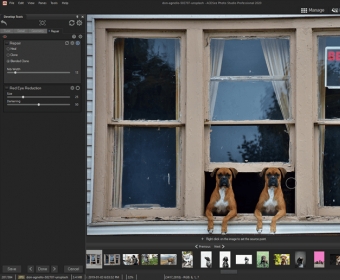
The most important pro-only feature is the possibility to process RAW image files in a non-destructive way. A RAW image file contains minimal processed data directly taken from the image sensor in a digital camera and serves the same purpose as a film negative in traditional photography. These files cannot directly be used for display in most software, but need to be processed first. Non-destructive editing means that the changes you make to the photo, like color correcting or contrast, are not directly applied to the information in the file. This information is stored in a separate file leaving the original data unaltered. When you are completely satisfied with your image you export it to a new file and use that file for further editing or printing. This non-destructive mode only works for raw images, if you edit a photo in any other format the image itself will be changed although the program gives you the option to save the original for later retrieval.

Working with ACDSee Pro reminds me of working with Adobe’s Lightroom, which however, has more options, a better workflow and produces a slightly better image quality. Even so, it also costs quite a bit more and the results you get from ACDSee Pro are good.

So, do the added features add up to make this software a truly professional tool? Not yet, maybe a future version, but for an amateur with a serious interest in photography it is a decent and affordable choice.

If all you need is a way to manage your library of pictures and need some basic raw image processing this program might be for you. The cataloging and organizing functions work great, but can also be found in its smaller brother. The RAW processing is good but leaves room for improvement.
Advantages
  • Lots of options to organize your pictures.
  • Added features for selecting images from photo shoots.
  • Non-destructive editing (RAW only).
Disadvantages
  • Heavy on system resources.
  • Raw processor very basic.

Reviewed by: Natalia Levchenko

Reviewer rating: Editor's rating 4

Screenshots

Organize your pictures Organize your pictures The image viewer The image viewer Raw processing Raw processing

Latest comments

Bishal Ghimire(beginner) Last year 
Best Photo viewer and basic editor i have been using this program for about 10yrs and its is the best i have ever seen!
Guest #543304(beginner) Last year 
Won't recognize file from my camera card and freezes up constantly! Stays running in the background using tons of memory!
BuckDanny(beginner) 8 months ago 
Hi, I just think you have to learn to work with it the right way! I use it at my whole satisfaction for years!
I've searched for better... but didn't find.
And.... it doesn't use a lot of memory in the background here.
I used 1Gb and it worked very fine. Now I have 2Gb ram and it works (of course) even better.
On the hitlist of my programs, it is the n° 1 ! Before Photoshop Elements 7.
Maybe you should look at your settings (under Tools->Options) and so!
Success with it!
Nice greetings!
Guest #215001(beginner) Last year 
with corresponding to its price and its capability i will not upgrade it again
I will replace it with the great free farstone
Add new comment All 6 comments
Tag cloud Extensions
.v8o ACDSee Offline Media
.v8p ACDSee Photo Disc
Download siClient

Email Address:

Password:

Register now »

Forgot password?

Copyright © 2009, Informer Technologies, Inc. About| Privacy and terms| Help| Feedback